Rating: 5/5 stars
Exceptional quality and support. Highly recommended for any FiveM server. The code is clean, well-documented, and easy to customize.
Make custom engine sounds in game from any car audio or AI, then put them on any vehicle.
 ESX
 QBCore
 Qbox
 Standalone
Measured on a clean server, idle and with the script in use.
Question:Can I make custom engine sounds for my server?
Make a custom engine sound from any car audio file you have, or let AI generate one for you. Type /vse and the editor opens in game. You don't need OpenIV, CodeWalker, coding or any technical knowledge: everything is automated, with one click to build the sound and one click to put it live on your server. It works on any server: fully standalone, with QBCore, Qbox, ESX or no framework at all.
Question:Can I sell my sounds to players?
Once you've made a sound, you can turn it into income. Put your sounds up for sale and players buy a custom sound for their own car with in-game cash, an item, or both. Sounds made from your own recordings or with AI can also be sold as packages on your Tebex store. Each sound goes on one car by its plate, so two cars of the same model can sound different. A mechanic can fit it as roleplay, or you can let players fit it themselves. It's all up to you.
Question:Can my mechanics install sounds?
Mechanics rev the car in the bay so everyone nearby hears the new sound, switch between stock and new, and send the owner a quote. The owner accepts it on their own tablet, and the mechanic fits the sound with the hood open. Every job is saved to the car's history.
Question:Can players try a sound before they pay?
Yes. The owner takes the car out on a private test track with the new sound for a timed drive. If they don't buy, the car goes back to how it sounded before.
Question:What if my server has no mechanics?
Switch to self-service and players fit sounds to their own car at a shop spot you choose, with the same rev preview and test drive. No mechanic needed.
Question:How do players pay?
Charge in-game cash, an item like a sound token, or both, or give a sound away for free. To earn real money, sell a sound as its own package on your Tebex store, and the buyer gets it fitted to their car in game.
Question:How do I control what is for sale?
Set a price for each sound, limit how many cars can carry it and which vehicle classes it fits. See how many cars have it, which models it's on and how much it has earned.
If you're worried about where to get engine audio, don't be: the built-in library comes with 28 engine sound banks and 64 pop, limiter and dump valve clips, ready to use on any car. You can also search Freesound's engine sounds right from the editor menu with a free Freesound key.
Question:Can I use my own recordings?
Upload engine recordings from your phone or PC through a link the editor gives you, and use them on any part of the sound.
Question:How hard is it to put a new sound on a vehicle?
Easier than you think. You never need to touch vehicles.meta or any other .meta file, and you never need to open a code editor. Everything happens at runtime: pick any vanilla or addon vehicle in the editor, then assign, swap or remove its sound and hear it change on the spot, without any restart.
Question:Will other players hear the new sound?
Yes. Everyone on the server hears it, including players who join later, whether the sound is set for a whole vehicle model or fitted to one player's car.
Question:Does it work with my target and inventory scripts?
Open the tablets with ox_target, qb-target, an E prompt or your own menu. The framework, inventory and target bridges are open files, so you can add any system your server uses.
Question:Can I preview the engine before putting it in-game?
Rev your sound right in the editor with an ignition key, gas pedal, tachometer and a 6-speed gearbox. The simulator gives you a quick idea of how the sound will feel before you put it in game. It won't sound exactly the same in game, so test the final sound in a real car with dev mode.
Question:How do I test a sound without traffic and noise in the way?
Swap between sounds while you drive with the dev mode HUD. Quiet World stops traffic from spawning and mutes radio and ambience, so you hear only the engine, and the test track gives you an endless empty floor above the map for full-throttle runs.
Question:How much control do I get over the sound itself?
Edit each part of the engine on its own: idle, acceleration, deceleration, start-up and shut-off. Trim, layer, pitch, fade and reverse clips, and shape each part with EQ, drive, compression and reverb.
Question:Does it handle pops, bangs and turbo sounds?
Add rally pops, rev limiter pops, dump valves and a wastegate. Tune how the sound plays in game, or pick a preset: Stock, Quiet, Sporty, Race or Rumble.
Question:Can I change a sound after it is live?
Change a sound whenever you want, recompile and load it in game without restarting the server. Loading respawns cars that use custom sounds without their mods and removes parked ones, so do it at a quiet moment.
Question:Can AI make the sounds for me?
Describe the sound you want and AI generates it, for one part of the engine or the whole thing. AI is optional and uses your own ElevenLabs key. Everything else works without it.
Our customers love our FiveM scripts and resources. Here is what they are saying:
Exceptional quality and support. Highly recommended for any FiveM server. The code is clean, well-documented, and easy to customize.
Best investment for my server. Clean code and easy to customize. The team provides excellent support and regular updates.
Great value and performance. The documentation is comprehensive and the community is very helpful.
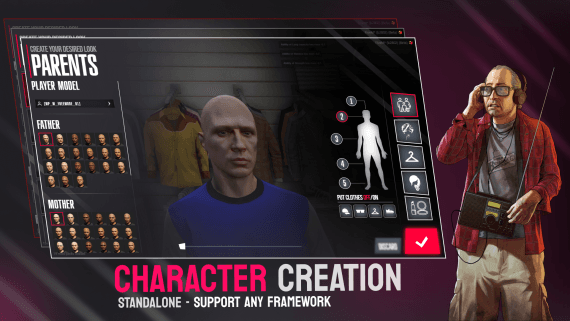
Character creation with parent heritage and face and body editing.
ESXQBCoreQboxStandalone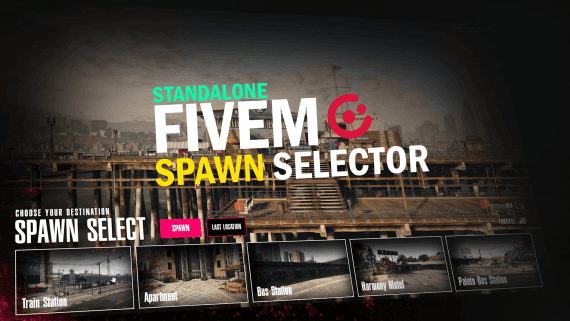
Players choose where they spawn from a list of locations.
ESXQBCoreQboxStandalone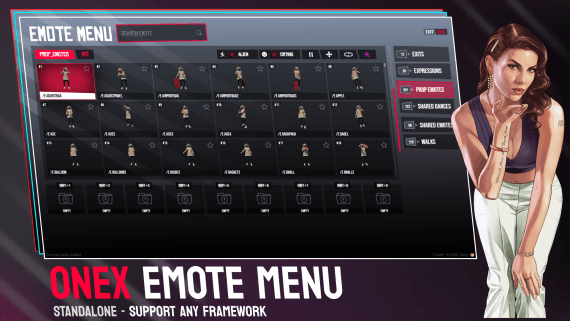
Find and play emotes from a grid menu, sorted into categories.
ESXQBCoreQboxStandalone