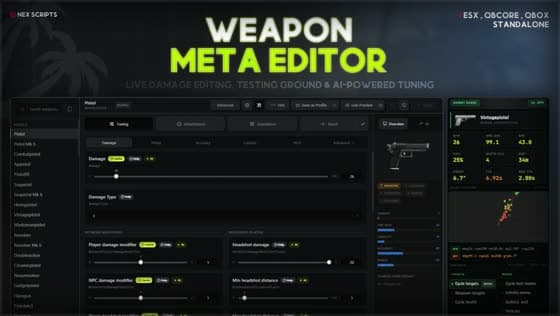
Weapon Meta Editor changelog
7 releases since 10 May 2026 · latest 2.3.1
2.3.1
Latest22 Sep 202650 viewsThis is a large release with extensive recoil system improvements. If your server runs any other recoil script alongside this resource, the new conflict detector will alert admins on load — review that prompt before dismissing it. The global drive-by toggle has been replaced by per-weapon Drive By tabs, so any per-weapon drive-by configuration will need to be reviewed in the editor after updating.
Before you update
Migration steps
Updating from v2.0.0 or older?
onex-weaponmeta_assets2's manifest and load behavior changed in this release:
- Back up both onex-weaponmeta_assets and onex-weaponmeta_assets2. (incase any issue happen you can easily recover your edits)
- Delete the old onex-weaponmeta_assets2 folder.
- Paste in the onex-weaponmeta_assets2 folder from this release's download.
- Start the server, then reapply any component/animation edits you'd made through the editor — they lived only inside the old assets2 folder and are not carried over by this process. But before it was little bit broken the component and animation part so assuming no one touched that so you are good to go just follow upper given steps.
Breaking change
AI provider config removed
The AI feature now detects your provider automatically from your API key prefix. If you previously had a provider setting in your config, it is no longer needed and can be removed.
Preciesly this set weaponmeta_api_provider "groq" not required but if you have it already you can keep it. Just deperecated this only setting convar weaponmeta_api_key automatically now detect the provider.
Config file
Check shared/config.lua
Main configuration file — review after updating, particularly if you had an AI provider setting. Copy your settings across instead of overwriting the file.
Performance
Startup is dramatically faster. A fresh boot that used to take up to ~15 seconds with a full addon set now finishes in about 6-8 seconds — and on a clean Windows run we measured the slowest startup phase drop from ~12.7s to ~1.0s (over 90% faster). Once everything's set up and warm, that same phase is down to a quarter-second. A manual resource restart mid-session — previously the slowest case at ~12.4s — now lands around 2 seconds, roughly 85% faster. Actual numbers vary by addon count and OS, but the difference is not subtle.
New16
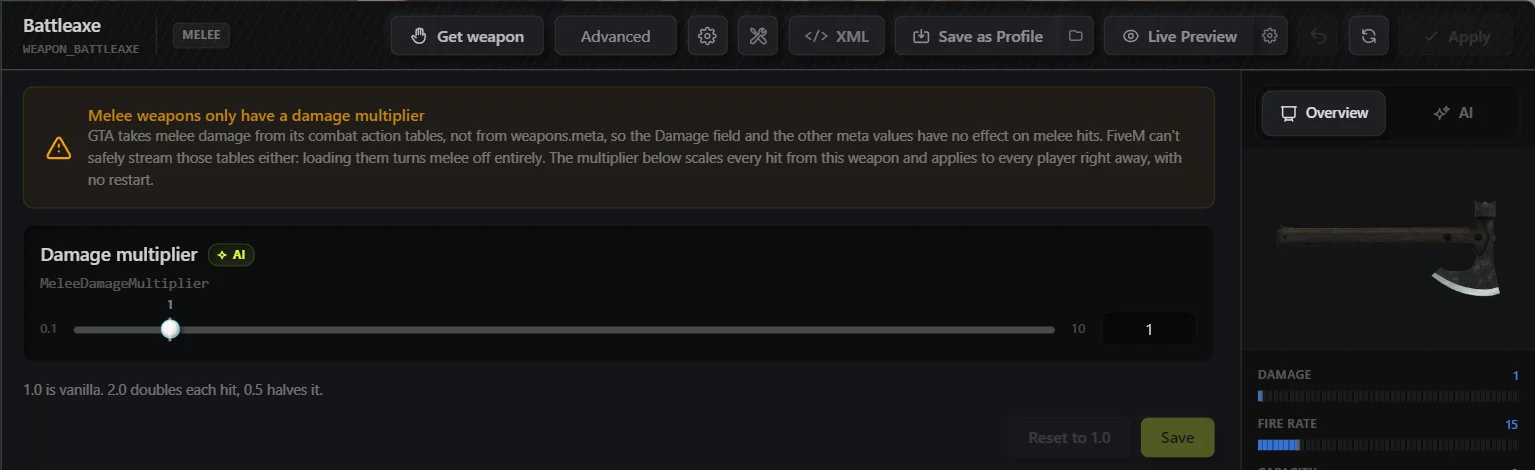
Melee damage multiplier
GTA takes melee damage from its combat action tables, not from weapons.meta, so the old raw meta editor for melee weapons never actually did anything — the Damage field and other meta values have no effect on melee hits, and FiveM can't safely stream those combat tables to change that. Melee weapons now expose a single damage multiplier instead (0.1-10x, 1.0 = vanilla), applied directly at hit time so it affects every player right away with no restart needed.
Magazine size and ammo cap editing
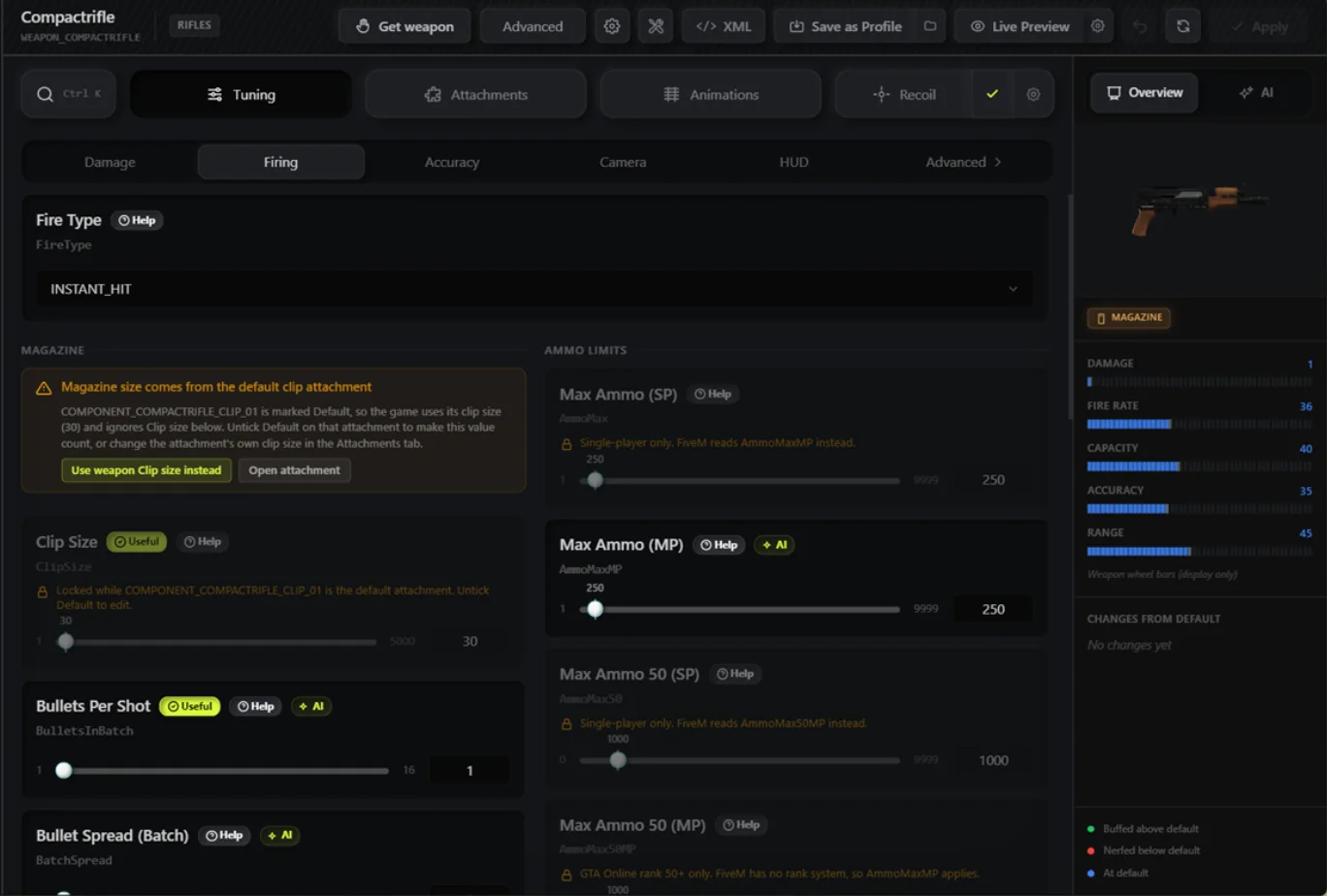
Both of these looked editable before but weren't reliably applying. Now fixed:
- Magazine size — editing it used to save fine but often had zero effect in-game, because on vanilla weapons the real magazine size comes from the weapon's default clip attachment, not the ClipSize field you were editing. The editor now detects when a default clip attachment is active, locks the slider with an explanation, and gives you a one-click way to switch it off (or jump straight to that attachment) so your edit actually takes effect.
- Ammo cap (AmmoMax) — these values live in a separate ammo-type entry, not in the weapon's own data, and edits to them were being silently dropped — never written anywhere, with no error shown. The UI also displayed placeholder numbers instead of the real saved values. Both are now fixed: edits write to the correct ammo entry and apply to every other weapon that shares that ammo type, and the UI shows real values.
Conflict detection for recoil scripts
On startup, the resource checks for known framework recoil scripts (currently qb-weapons and qbx_smallresources' recoil module) — it confirms the resource is running, the specific client file is actually loaded, and that file still calls camera-kick natives (so a disabled or stripped-down copy doesn't trigger a false alarm). If it finds a live conflict, admins get an in-game prompt with two choices: Accept (dismiss it, no behavior change, decision remembered) or Use framework recoil (disables this resource's recoil system server-wide so the other script has sole control). Renamed forks or escrowed (.fxap) copies of a conflicting script can't be detected.
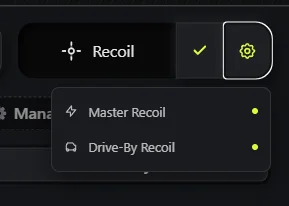
Per-weapon Drive By tab
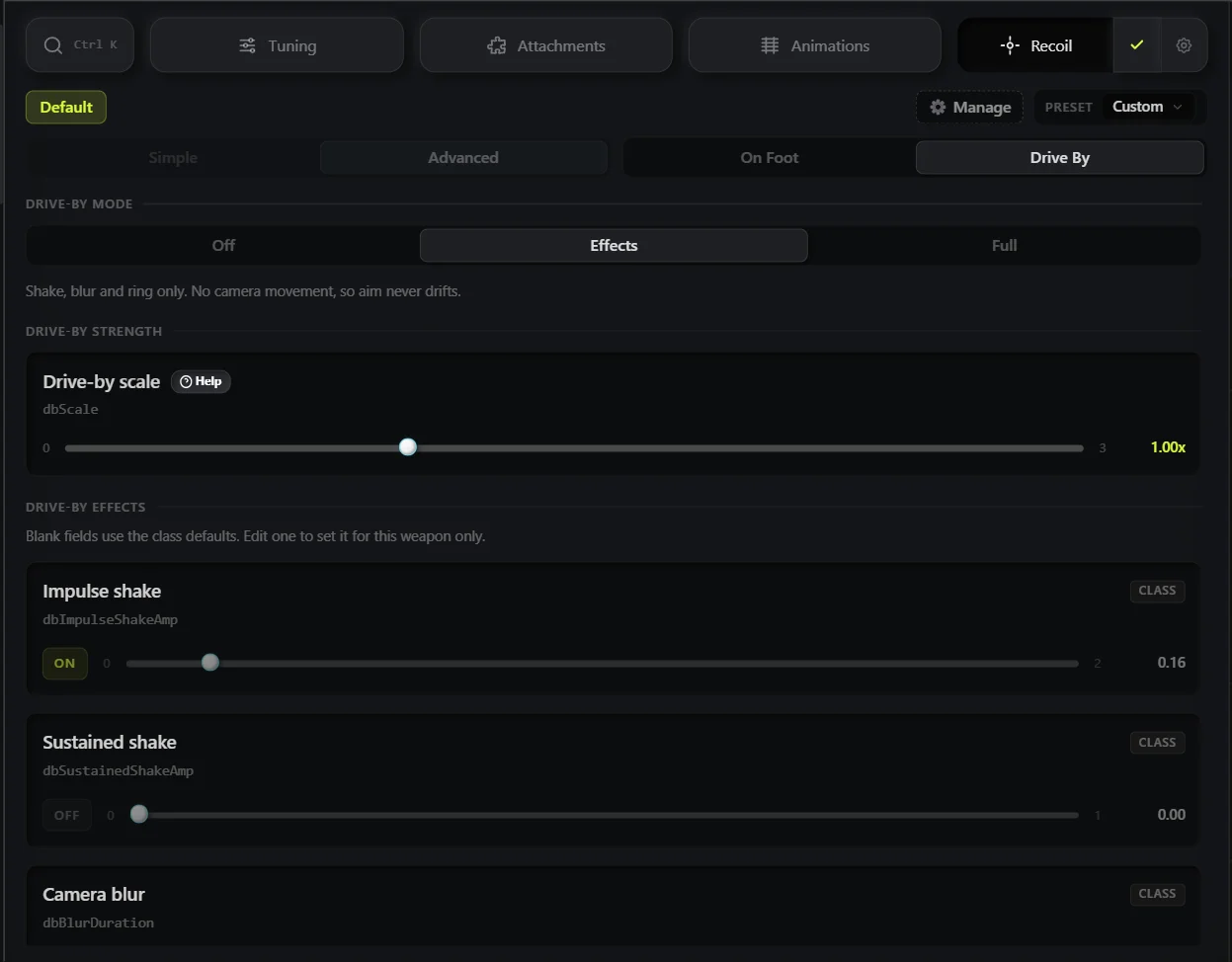
Drive-by now has a real per-weapon panel: a Mode selector (off / effects / full), a global Scale slider (0-3x), and four per-weapon effect toggles (impulse shake, sustained shake, camera blur, screen ring), each of which falls back to a sensible per-class default when left unset. The global Scale is a multiplier on top of whatever amount the weapon/class uses — it doesn't replace the per-weapon settings, both apply together.
Vehicle recoil modes and per-weapon vehicle recoil override
Three modes, chosen globally or per weapon (per-weapon always wins when set): Off (no recoil while seated), Effects (shake/blur/ring only — camera doesn't move, so your aim never drags), and Full (adds real camera kick on top, so aim can drag like it does on foot). Full automatically falls back to Effects in first-person view, since FiveM's camera-pitch native doesn't work in that view.
Retuned recoil camera effects per weapon class
This is a real tuning change, not just a refactor. Heavy weapons (miniguns, RPGs, railguns) used to inherit shotgun timing, which was too fast for their fire rate and left blur/ring effects stuck on — they now have their own class with correct timing. Revolvers previously matched only when your saved recoil table already had an entry for that exact weapon name; unconfigured or unrecognized revolver variants fell through to default behavior. They're now matched by weapon hash as a fallback, so every revolver variant gets the REVOLVER class even without a saved entry.
Vanilla attachment and animation editing restored
These fields were locked in an earlier build after testing showed the game engine doesn't reliably pick up re-declared vanilla component/animation data. Further testing showed the lock was too strong — it's inconsistent rather than fully broken (the same edit can apply to one weapon and silently not apply to another), so editing is unlocked again with an inline warning that changes may not take effect, since this is a known FiveM/engine limitation rather than something this resource can fully control.
Addon component and animation loading from assets
Addon weapon components and animations used to be declared both in the addon's own resource and in a mirrored copy under the resource's asset system, risking duplicate registration. The addon's own declarations for those two file types are now disabled at prepare-time so only the asset mirror loads. If an addon is later renamed or removed, its old mirror folder is detected automatically on startup and moved aside instead of being left behind as dead weight.
Component pool budget display
The editor now shows a live projected-vs-cap usage figure for the addon component pool, so you can see how much headroom you have left before you hit the limit instead of finding out when components stop loading.
Ctrl+K field search palette
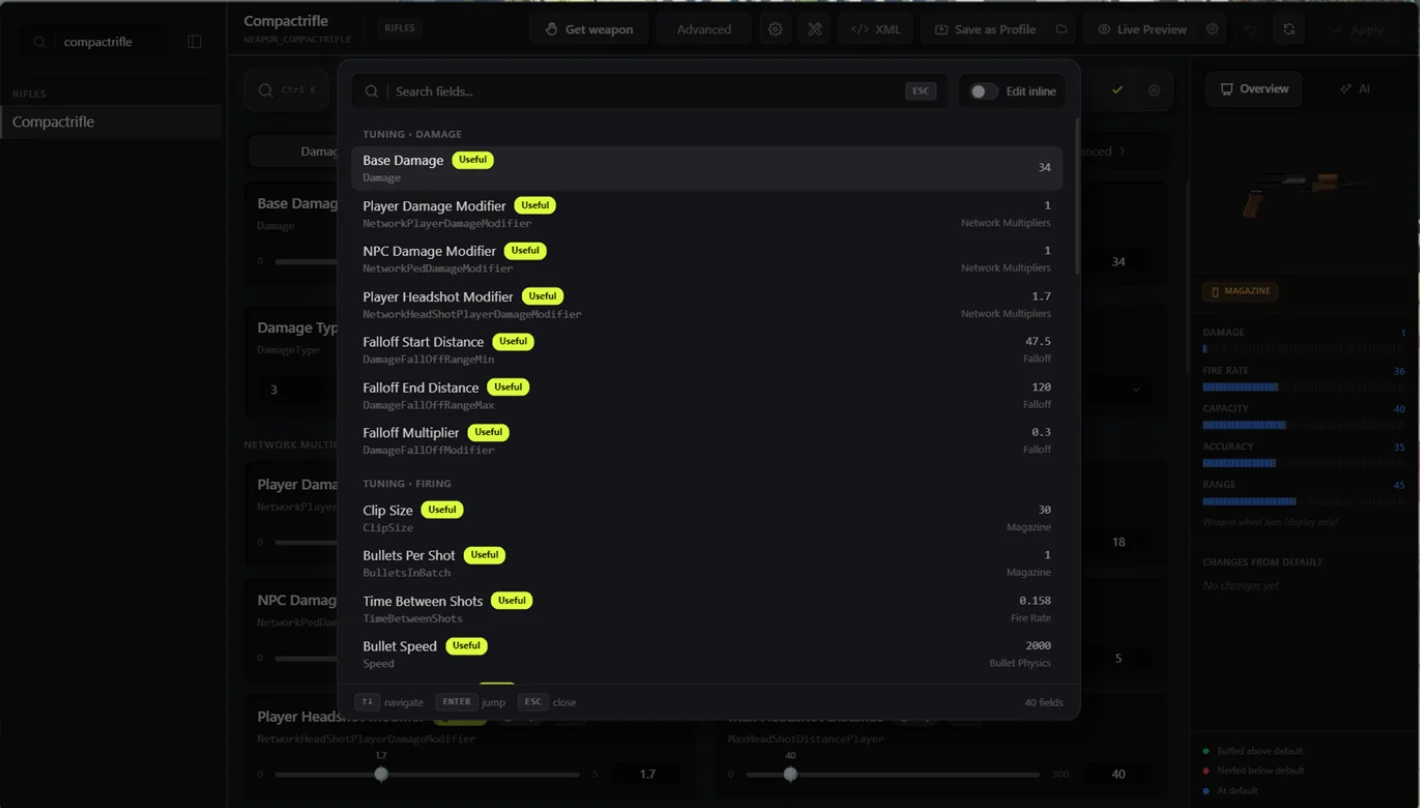
Press Ctrl+K to search across every tuning field for the currently selected weapon — roughly 215 fields spanning Damage, Firing, Accuracy, Camera, HUD, Force, FX, Flags, Ammo, Animations, and Recoil.
- Matches on the field's display label, its internal meta key (e.g. typing "damage fall off" matches DamageFallOffRangeMin), the tab/section it lives in, and its tooltip text — every word you type has to match something, in any order.
- Selecting a result normally jumps you to that field: switches tab, opens the right sub-panel, scrolls it into view, and flashes it.
- Toggle Edit inline in the palette header to skip the jump entirely — the real field control (slider, dropdown, checkbox, etc.) renders right there in the results, so you can change the value without leaving the palette. This preference is remembered between sessions.
- A weapon has to be selected first, since the palette shows that weapon's live values. Per-component attachment fields aren't indexed and won't show up in search.
Pending-change notifications
Component and animation edits apply immediately in the editor but need a resource (and sometimes a second asset-resource) restart before they're live in-game. A banner now tracks this and tells you exactly how many changes are waiting, with a Restart button right there — no more guessing whether an edit actually took effect. Ordinary weapon-field edits (damage, recoil, etc.) are unaffected; they save live and never trigger this banner.
Addon update tracking
The resource now hashes each vanilla-override addon file's content and compares it against the hash recorded when you last edited it. If the addon author ships an update, you get a prompt naming the file, the source addon, and the affected weapons, with a choice: Keep my edits (do nothing) or Migrate (replace your edits with the addon's new version). Previously an addon update could silently overwrite your changes with no warning.
User edits preserved across restarts on vanilla-replacement files
For addons that override a vanilla weapon (rather than adding a new one), every restart used to re-copy the addon's shipped file over your saved edits, silently reverting them. Edits are now treated as a persistent layer that's only rebuilt from the addon's file when it's genuinely missing or untouched — a normal restart no longer wipes them.
Single-player-only field locking
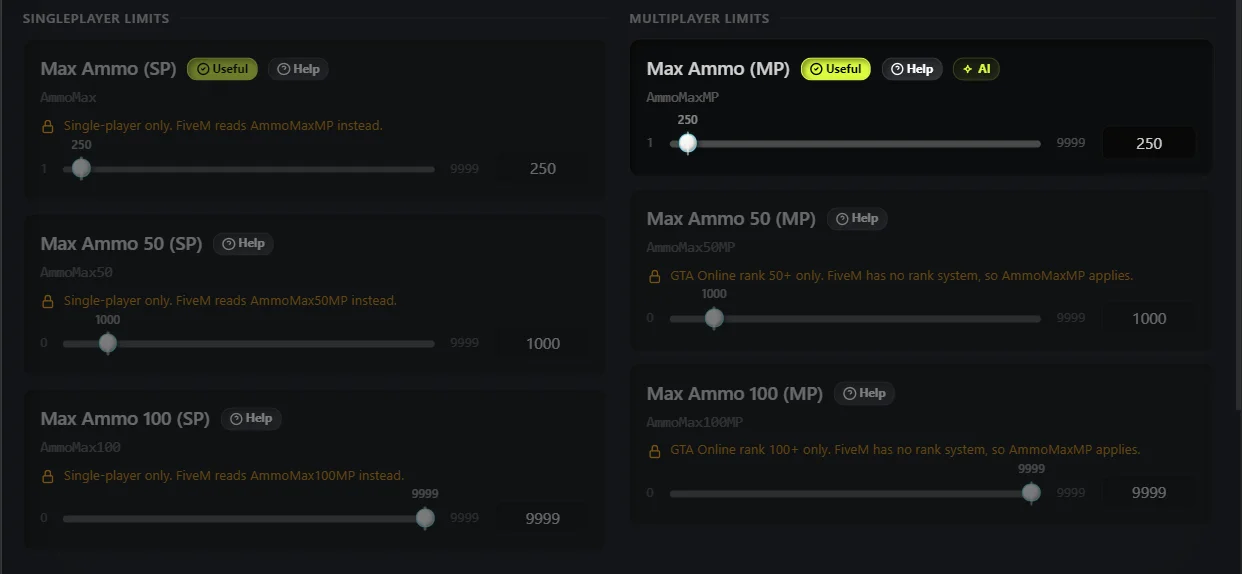
A fixed set of fields only function in GTA's single-player mode — AmmoMax/AmmoMax50/AmmoMax100, ReloadTimeSP, and two SP-only FX chance fields — and FiveM reads their MP-suffixed counterparts instead. These are now locked in the editor with an inline note naming the live field to edit instead, plus a separate lock for GTA Online rank-gated fields that have no equivalent on FiveM at all.
Improved SETUP REQUIRED banners
Setup guidance now branches by the actual problem instead of showing one generic message — a missing filesystem permission prints the exact add_filesystem_permission line to add for that asset resource, a blocked addon-rename capability prints the add_unsafe_child_process_permission line instead, and separate notes cover stale FXServer builds, a missing bin/ upload, unsupported OS, and a non-executable helper binary.
Automatic AI provider detection
The AI feature now reads your API key's prefix to pick the provider automatically (sk-or- for OpenRouter, gsk_ for Groq), falling back to Groq if the prefix isn't recognized — no provider field to set or get wrong in the config anymore.
Improved4
- Significantly reduced startup work and improved warm-start times. Addon scans that previously required multiple passes now complete in fewer cycles, and renamed addons are all restarted in a single refresh at boot.
- Late-joining players receive recoil sync faster due to a more efficient per-player sync thread with fewer unnecessary updates.
- Recoil broadcasts now send only the relevant weapon's data rather than the full recoil table, reducing network traffic when saving recoil settings.
- The editor now checks only the selected weapon for pending edits when you open it, rather than scanning all weapons, making the editor faster to open on servers with large weapon lists.
Fixed28
- On-foot recoil kicks no longer consume player look input, so camera movement after shots feels natural again.
- Fresh installs no longer log a warning about a missing recoil configuration file on startup.
- The recoil toggle is now saved correctly regardless of which editor tab is active when you save.
- GTA engine built-in weapons no longer appear in the addon weapons list.
- Searching for a weapon that returns no results no longer leaves stale rows visible in the weapon list.
- On-foot recoil kicks now ease in smoothly and heading writes are paused during camera blends, preventing jarring camera snaps.
- Addon weapons that have been removed from disk are now skipped during scanning instead of causing errors.
- GROUP_HEAVY weapons now have their own recoil class instead of inheriting shotgun behaviour, so heavy weapons feel correct out of the box.
- Revolvers are now matched by weapon hash, ensuring the REVOLVER recoil class is applied correctly to all revolver variants even when unconfigured.
- Recoil kicks now land at the correct position and recover properly to the start of the burst rather than drifting.
- Camera blur from recoil is no longer applied when the blur duration is set to zero.
- Kicks now settle correctly through a burst and recover after the trigger is released, instead of cutting out early or stacking incorrectly.
- Heading kicks are held correctly while the aim camera is blending, preventing unwanted snapping during ads transitions.
- Queued recoil kicks no longer get cut short — they now land fully on trigger release as intended.
- Recoil is now correctly suppressed when firing from a vehicle, so drive-by recoil only applies when the drive-by system is active.
- Drive-by aim no longer sinks progressively lower with each shot fired from a vehicle.
- Vanilla component edits are now compared against their own original shipped file rather than an incorrect reference, preventing false "no changes" results.
- A component edit is now correctly written to every file that declares it, not just the first one found.
- Attach-point items are now read in the correct order, fixing cases where attachment data was silently ignored.
- Component and animation apply failures are now reported clearly in the UI instead of failing silently.
- Custom base component snapshots are no longer incorrectly flattened during preparation, which was causing component data to be lost.
- Preset saves made via Save to Profile now actually persist across sessions.
- Preset writes are now correctly routed to the addon file, and any failures are reported rather than silently discarded.
- Recoil settings are now reliably delivered to non-admin players and to players who join after the server has started.
- The Linux helper binary now self-heals if it loses its executable permission on locked-down hosts, preventing the helper from silently failing after a permission reset.
- The helper is now spawned from the correct staged path after a passing probe, resolving startup failures in certain configurations.
- The search palette now stays contained within the editor window and scales correctly with window size.
- HUD stat bars are now marked as display-only in the editor, and range tooltips are cross-linked so their relationship is clear.
Files changed38
bin/6 files
- README.md
- pkg-linux-arm64
- pkg-linux-x64
- pkg-linuxstatic-arm64
- pkg-linuxstatic-x64
- pkg-win-x64.exe
client/1 file
- client.lua
client/modules/2 files
- melee_damage.lua
- recoil.lua
data/presets/1 file
- .gitkeep
locales/18 files
- en.lua
- ar.lua
- bg.lua
- ca.lua
- da.lua
- de.lua
- es.lua
- fa.lua
- fr.lua
- he.lua
- it.lua
- jp.lua
- ko.lua
- pt.lua
- ru.lua
- th.lua
- tr.lua
- zh.lua
server/6 files
- playerConnecting.lua
- ai_broker.lua
- recoil_conflicts.lua
- scanner.js
- server.lua
- xmlBuilder.lua
shared/2 files
- config.luaHas your settings
- weapons.lua
1.2.1
12 Aug 202638 viewsThe config-file recoil master switch no longer exists. If you previously relied on it to disable recoil server-wide, use the new in-game server-wide master toggle going forward.
New1
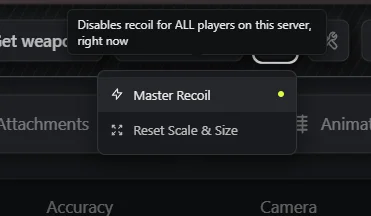
Added a server-wide master recoil toggle, allowing you to enable or disable the recoil system for all players at once without restarting the resource.
Fixed1
- The spray pattern preview shown in the recoil configuration UI now almost (can be inaccurate sometime) accurately matches the actual in-game recoil behaviour players experience.
Files changed23
client/1 file
- client.lua
client/modules/1 file
- recoil.lua
locales/18 files
- ar.lua
- bg.lua
- ca.lua
- da.lua
- de.lua
- en.lua
- es.lua
- fa.lua
- fr.lua
- he.lua
- it.lua
- jp.lua
- ko.lua
- pt.lua
- ru.lua
- th.lua
- tr.lua
- zh.lua
server/1 file
- server.lua
1.1.0
28 Jul 202647 viewsBefore you update
Config file
Check shared/config.lua
Configuration options for permission settings and editor access control. Copy your settings across instead of overwriting the file.
New3
- Editor access is now permission-gated. Only players with the appropriate ACE permission can open the weapon meta editor in-game, preventing unauthorized access on live servers.
- Added the `weaponmeta_open` console command, allowing server owners to open the editor directly from the server console or via RCON.
- Added an opt-in server event to open the editor programmatically without a permission check. This is intended for server owners who manage access control through their own framework and want full control over when the editor is shown to a player.
Fixed1
- The server will now log a clear warning if the ACE permission bootstrap fails silently, so server owners are alerted when editor permissions have not been applied correctly on startup.
Files changed5
client/1 file
- client.lua
client/testing/2 files
- target_manager.lua
- test_vehicles.lua
server/1 file
- server.lua
shared/1 file
- config.luaHas your settings
1.0.0
26 Jul 202641 viewsPerformance and Bug Fix Update
MUST UPDATE...
- Memory usage reduced by up to 70%
- Fixed lag spikes during shooting on live servers
- Resolved all known performance issues
- Zero performance impact while idle
New3
- AI error messages are now blame-correct and actionable — when something goes wrong, the AI assistant tells you exactly what failed and what to do about it, rather than returning a generic error.
- Live edit-lock refresh — when another player releases their lock on a weapon entry, your editor automatically refreshes with the latest weapon data so you are never working on stale information.
- Full localization across all 18 supported locales. Editor tabs, panels, toolbar, recoil modal, field labels, section headers, animation mode options, and Useful/Help and Addon/Override badges are all fully translated.
Fixed5
- Field names inside the editor's code spans were being incorrectly bolded automatically. They now render with their intended formatting.
- AI prompt responses in the inline panel now render markdown formatting correctly instead of displaying raw markup text.
- Recoil parameters set in the editor are now applied live to weapons that do not yet have an entry in recoil.json, so changes take effect immediately without requiring a restart.
- The recoil intensity shown in the editor was always displaying 0.5 regardless of the weapon's class. It now correctly shows the intensity derived from the weapon class.
- The prepare helper was incorrectly renaming addon
weaponcomponents.metafiles and leaving already-broken addon entries in a bad state. It now leaves those files untouched and repairs previously broken addons.
Files changed24
client/modules/1 file
- recoil.lua
locales/18 files
- ar.lua
- bg.lua
- ca.lua
- da.lua
- de.lua
- en.lua
- es.lua
- fa.lua
- fr.lua
- he.lua
- it.lua
- jp.lua
- ko.lua
- pt.lua
- ru.lua
- th.lua
- tr.lua
- zh.lua
nui/1 file
- /**
server/3 files
- ai_broker.lua
- scanner.js
- server.lua
0.15.0
9 Jun 202660 viewsBefore you update
Breaking change
Mirror directory layout has changed
The script will automatically migrate your existing mirror to the new flat meta/<addon>/<hashed-name> structure on first boot via the --flatten migration. No manual action is required, but you should ensure the server has write access to the mirror directory before updating. Do not interrupt the server during the first startup after upgrading.
Config file
Check shared/config.lua
Main configuration file — now includes Config.Locale, Config.Log toggles, Config.VanillaSourcePriority, and per-server field-limit overrides. Copy your settings across instead of overwriting the file.
New15
18-language locale system
is now built in. The script ships ready-to-use translations for Arabic, Bulgarian, Catalan, Danish, German, Spanish, Farsi, French, Hebrew, Italian, Japanese, Korean, Portuguese, Russian, Thai, Turkish, Chinese, and English. Set Config.Locale in your config to switch language server-wide.
Vanilla override layer
when an addon resource supplies a replacement for a base-game weapon, the scanner now detects and tracks it separately from true addon weapons. Server owners can reset any overridden vanilla weapon back to its original GTA values directly from the menu.
Override badge
now appears in the weapon list for any vanilla weapon that is being sourced from an addon. Hovering the badge shows a tooltip explaining the override, with long tooltip text wrapping cleanly instead of overflowing the menu.
Loading overlay
is shown inside the menu while the base meta initialises on first startup, so players and admins see clear feedback instead of a blank or partially loaded state.
Config.VanillaSourcePriority
lets you control which addon resource wins when multiple addons each attempt to override the same base-game weapon.
Weapon collision banners
now report when two or more addon resources define the same weapon name, showing the real resource names and all shadowed sources so you can resolve conflicts without guesswork.
Windows MAX_PATH protection
the mirror directory layout has been flattened to meta/<addon>/<hashed-name> so paths never approach the 260-character Windows limit. A startup warning is also logged if any path gets close to the limit.
Standalone version and artifact checker
added to the server startup sequence, so outdated or mismatched helper binaries are flagged immediately on boot.
ox_inventory weapon delivery on QBox
when using ox_inventory, the script now adds the weapon with 250 rounds, deduplicates already-owned weapons, and skips re-equipping a weapon the player is already holding.
Config.Log toggles
let you enable or disable specific categories of server-side logging to keep your console output clean.
One-time flat mirror migration
(--flatten) automatically reorganises an existing mirror directory to the new safe layout on first run after upgrading — no manual file moves required.
Per-server field-limit and default overrides
server owners can now adjust slider caps and field defaults in config to match the real values used by their weapon mods, without being constrained by built-in limits.
Scanner blacklisting
of addon resources that contain broken vanilla meta files, preventing corrupt data from being applied and causing silent failures.
Orphaned vanilla override auto-backup
if an addon that was overriding a vanilla weapon is removed, the scanner automatically backs up the orphaned override file rather than leaving stale data in place.
Post-scan probe
checks for any asset writes that the scanner expected to complete but did not, surfacing missed writes as clear log entries instead of silent failures.
Improved2
- Scanner startup performance is significantly improved for servers with large addon collections. Addon scans are now cached, file-existence checks are batched, and cold-boot writes are grouped into a single batched operation rather than one file at a time.
- Helper binary walk speed improved by skipping the
stream/directory during addon scanning and fast-pathing addons that have already been processed, reducing startup time on large servers.
Fixed20
- Recoil settings now fall back to the weapon class defaults when a connecting client does not have per-class defaults loaded, preventing recoil from being silently ignored on those clients.
- Recoil was previously only applied to weapons with an explicitly known group. It now resolves the weapon group natively, so recoil applies correctly to any weapon including addon weapons.
- Locale and weapon list:
Config.Localeis now respected when the menu is opened, and the weapon list is grouped by weapon type in a stable order rather than varying between sessions. - Warm-boot restart loop (Phase 8) in the scanner has been resolved. Servers that had the script restart mid-session could enter a continuous restart cycle — this no longer occurs.
- Single-item DLC weapon files were previously misclassified as addon weapons. They are now correctly identified as vanilla-replacement files.
- Asset-resource restart at the end of startup is now a single conditional call, eliminating duplicate restarts that could cause brief weapon-data gaps on busy servers.
- False WRITE FAILURE errors were logged when the server correctly reverted a vanilla-replacement file. These false alarms no longer appear, and the collision winner is now reported accurately.
- Batched-write truncation on Linux: the helper now reads the full payload before writing, fixing cases where large batches of weapon file writes were silently cut short on Linux hosts.
- Helper errors are now surfaced: when batched writes fail, the helper's error output and exit code are included in the server log so the cause is immediately visible.
- Collision banner accuracy: intra-resource collisions are now preserved in the banner output, and the footer message is tailored depending on whether the conflict is within one resource or across multiple resources.
- Ready summary classifier now checks against the full 158-entry vanilla weapon list, so weapons that were previously miscounted as addons appear correctly in the startup summary.
- `requestData` gating: player data requests are now blocked until the full startup sequence completes, not just until assets are written, preventing partial-data responses during boot.
- Override badge tooltip now accurately describes what editing that weapon will do, correcting misleading text that appeared in the previous version.
- Scanner ping-pong loop between vanilla-source addons and the prepare step has been eliminated — the scanner now skips re-preparing files it already knows are vanilla-sourced.
- Misrenamed vanilla-replacement files left over from earlier versions are now automatically renamed to the correct format on startup without requiring manual intervention.
- Phase 7 watchdog hang caused by the resource scanner blocking for too long during large addon scans has been resolved — the scanner now yields appropriately to keep the server healthy.
- Slider caps for several weapon meta fields were set too low to accommodate real values used by weapon mods. Caps have been raised to reflect the full valid range.
- Asset writes and helper diagnostics on hardened Linux hosts (restricted filesystems) have been made more robust, reducing silent failures when file permissions are tightly locked down.
- Mirror write target is now always the mirror directory — previously, a source-drift condition could cause edits to be written to the wrong location. Override re-capture now triggers automatically when the source file drifts.
- Per-resource asset copy for vanilla-replacement files is no longer attempted during scanning, preventing unnecessary file operations and potential overwrites.
Files changed45
_framework/lib/1 file
- inventory.lua
bin/9 files
- README.md
- pkg-linux
- pkg-linux-arm64
- pkg-linux-x64
- pkg-linuxstatic
- pkg-linuxstatic-arm64
- pkg-linuxstatic-x64
- pkg-win-x64.exe
- pkg-win.exe
client/4 files
- client.lua
- modules/recoil.lua
- testing/test_modes.lua
- testing/test_vehicles.lua
data/vanillaSchema/3 files
- weaponanimations.json
- weaponcomponents.json
- weapons.json
locales/18 files
- en.lua
- ar.lua
- bg.lua
- ca.lua
- da.lua
- de.lua
- es.lua
- fa.lua
- fr.lua
- he.lua
- it.lua
- jp.lua
- ko.lua
- pt.lua
- ru.lua
- th.lua
- tr.lua
- zh.lua
nui/1 file
- /all
server/5 files
- ai_broker.lua
- scanner.js
- server.lua
- version.lua
- xmlBuilder.lua
shared/3 files
- config.luaHas your settings
- locale.lua
- overrides.lua
0.9.5
16 May 202669 viewsBefore you update
Breaking change
Cerebras provider removed
The Cerebras AI provider is no longer supported. If you were using Cerebras, AI features will stop working — you must switch to OpenRouter or Groq instead. This change is required because the internal models have been updated and the new models are not available on Cerebras.
New5
Player join gating during startup scan
players are now held at the connection screen until the weapon metadata scan completes, preventing players from spawning before weapon configs are ready.
Added a `weaponmeta_revert` console command that lets server owners undo applied weapon meta changes for specific weapons.
Exclusions are persisted so they survive resource restarts.
| Usage | Description |
|---|---|
weaponmeta_revert | Reverts all addon weapons |
weaponmeta_revert <script_name> | Reverts a single addon weapon by script name |
Reverting an addon weapon permanently excludes it — the exclusion is saved to excluded_addons.json and persists across restarts, so the weapon won't be rescanned automatically. To re-add it in the future, manually remove its entry from that file.
Runtime Recoil-Group Assignment Exports
Server-side exports that let other resources assign players to recoil groups (or custom recoil parameters) on the fly — no script restart, no config edit. Assignments are per-player and per-weapon, and are pushed to the client immediately.
All four exports run server-side. Call them with exports['onex-weaponmeta']:<name>(...).
setWeaponGroup
Assigns a player's weapon to a predefined recoil group.
| Argument | Type | Description |
|---|---|---|
source | number | Server ID of the target player. |
weaponName | string | Weapon hash name (e.g. "WEAPON_CARBINERIFLE"). Pass "*" or an empty string to set a global fallback applied to every weapon the player holds. |
groupId | string | ID of an existing recoil group defined in the recoil table. |
Returns: true on success, false if the player is invalid, groupId is empty, or the group does not exist.
setWeaponParams
Assigns a custom recoil parameter table to a player's weapon, bypassing predefined groups entirely.
| Argument | Type | Description |
|---|---|---|
source | number | Server ID of the target player. |
weaponName | string | Weapon hash name, or "*" / empty for a global fallback. |
params | table | A recoil parameters table applied directly to that weapon. |
Returns: true on success, false if the player is invalid or params is not a table.
removeWeaponGroup
Clears a runtime assignment, reverting the player back to default recoil behaviour.
| Argument | Type | Description |
|---|---|---|
source | number | Server ID of the target player. |
weaponName | string | Weapon to clear. Omit it (or pass an empty string) to clear all runtime assignments for that player. |
Returns: true on success, false if the player is invalid.
getWeaponGroup
Reads back the current runtime assignment for a player's weapon.
| Argument | Type | Description |
|---|---|---|
source | number | Server ID of the target player. |
weaponName | string | Weapon to query, or "*" / empty for the global fallback. |
Returns: the assignment table — { group = "<id>" } or { params = {...} } — or nil if no runtime assignment exists.
Use Cases
- VIP / job perks — give a police or VIP job tighter recoil on duty weapons, then
removeWeaponGroupwhen they clock off. - Buffs & debuffs — apply a temporary "shaky hands" recoil profile when a player is injured, drunk, or affected by a status effect.
- Minigames & arenas — normalise recoil across all participants in a deathmatch or shooting range for fair competition.
- Attachment / gunsmith systems — swap recoil parameters live when a player adds or removes a weapon attachment.
- Progression systems — reward weapon mastery with reduced recoil as a player levels up a skill.
Assignments are stored in memory only and are automatically cleared when the player drops. Re-apply them on player join if persistence is required.
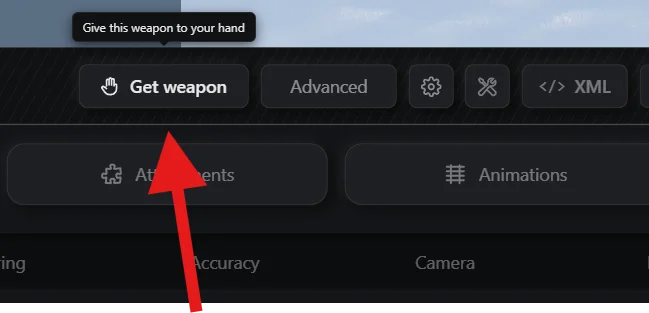
A Get Weapon button has been added to the main toolbar in the management UI, making it faster to retrieve a weapon directly from the interface without additional steps.
Servers running on Alpine Linux or musl-based environments are now supported.
The resource automatically falls back to a statically compiled helper binary when the standard binary is incompatible with the host system.
Previously, some Linux VPS setups would still show a permission error even after granting the correct server.cfg permissions — this has been fixed.
Fixed5
Addon weapons without a WEAPON_ prefix
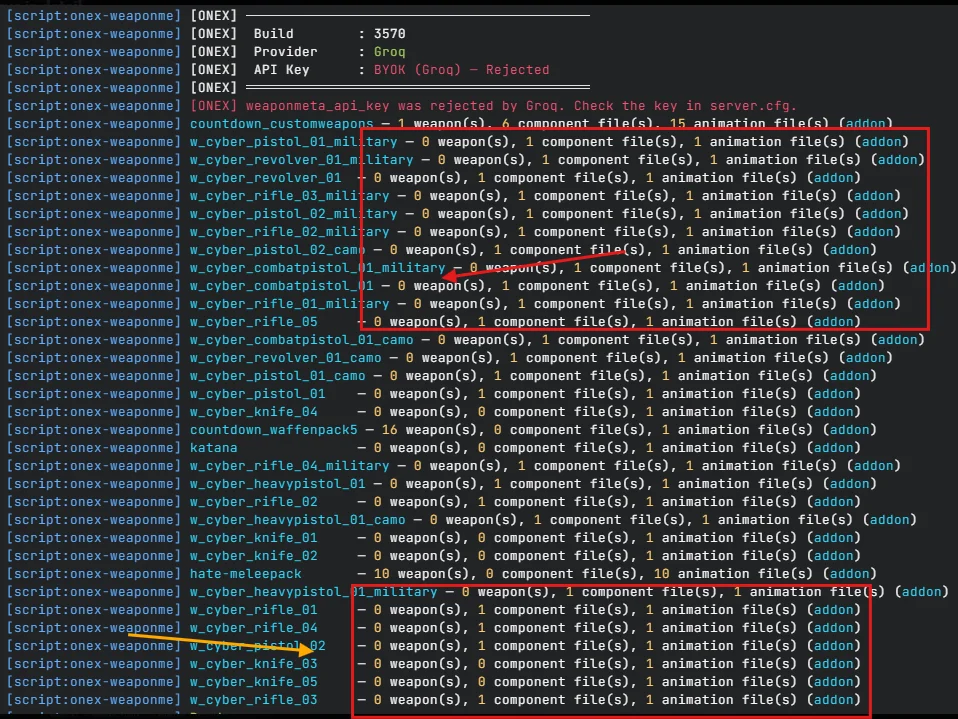
were previously skipped by the scanner due to a case-sensitivity issue. The scanner now correctly detects and includes all addon weapons regardless of prefix casing — this fixes compatibility with Cyber Weapons and many other addon weapon scripts.
Fixed a burst-start snap in recoil where the first shot of a burst would apply an abrupt pitch jump.
Recoil now ramps smoothly from the very first shot.
Fixed an issue where the setup banner would not appear on some servers due to asset writability checks failing.
The resource now correctly verifies writability using the appropriate FiveM file API.
Fixed a crash or silent failure when the resource registry was not refreshed after internal patching, which could prevent restarts from applying updated configs correctly.
On Windows servers running FiveM's sandboxed environment, filesystem operations that were incorrectly blocked are now properly detected and routed through the supported file-writing path.
Files changed15
bin/8 files
- pkg-linux
- pkg-linux-arm64
- pkg-linux-x64
- pkg-linuxstatic
- pkg-linuxstatic-arm64
- pkg-linuxstatic-x64
- pkg-win-x64.exe
- pkg-win.exe
client/2 files
- client.lua
- modules/recoil.lua
nui/1 file
- /* all
server/4 files
- playerConnecting.lua
- scanner.js
- server.lua
- ai_broker.lua
0.5.1
10 May 202666 viewsAddon weapon crashes are fully resolved. If you're still crashing after updating, your weapon data was likely corrupted by the broken version — open a ticket and we'll restore and reconfigure everything for you.
Documentation has been updated to reflect all changes below.
Before you update
Breaking change
Deprecated ai api convar weaponmeta_groq_key.
New convars are weaponmeta_api_provider and weaponmeta_api_key.
New AI Providers
Three AI providers are now supported:
- Groq
- OpenRouter
- Cerebras
OpenRouter and Cerebras both have free daily usage limits — no card required. If Groq is unavailable or you don't have an API key yet, either of these work as a drop-in alternative.
Breaking Changes
server.cfg — New Required Line
A new permission line is required. Add add_unsafe_child_process_permission onex-weaponmeta to your server.cfg. Full updated block:
server.cfg
AI Convars — Renamed
weaponmeta_groq_key has been removed. Replace it with two new convars:
weaponmeta_api_provider—"groq"|"openrouter"|"cerebras"weaponmeta_api_key— Your API key for the selected provider
Full setup guide: Setup AI
New12
Massively improved AI system
The AI has been completely overhauled. Here's what's new:
What it can do now that it couldn't before:
- Distance-aware damage —
"What's the headshot damage at 80m?"now returns the real number with falloff applied. Previously distance was ignored entirely. - Inverse tuning — Tell it the outcome you want:
"Make headshot damage 150 at 20m for player"and it computes the exact field value. No more trial and error. - Recoil by feel —
"Make this rifle feel punchy"resolves into real vertical kick, horizontal drift, and recovery values — not guesses. - Correct NPC math — NPC headshots have a hidden 1.5× engine multiplier that player headshots don't. The AI now accounts for it. Ask for 4 shots to kill, it dies in exactly 4.
- Bulk edits — Multi-field changes like falloff curves are bundled into a single Apply All instead of separate chips.
- Value validation — Every suggested value is range-checked before appearing as a chip. Out-of-bounds values are clamped or dropped automatically.
For a full breakdown and test prompts see the AI update guide.
Is it far superior to before?
Yes. The old chat could answer simple "how many shots to kill" questions and suggest single field changes through text markers. That was it. Distance was ignored. Recoil was guesswork. The math had a 33% error on every NPC headshot calculation. Bulk edits weren't a thing.
The new chat understands range, solves inverses, derives recoil from feel, gets the engine math right, and can explain what it's doing in plain prose. It's a different tier.
Weapon pool cap warnings
The server now logs a clear warning when your installed weapon count exceeds default pool limits, helping you catch configuration issues before they affect players.
Excluded addon opt-out
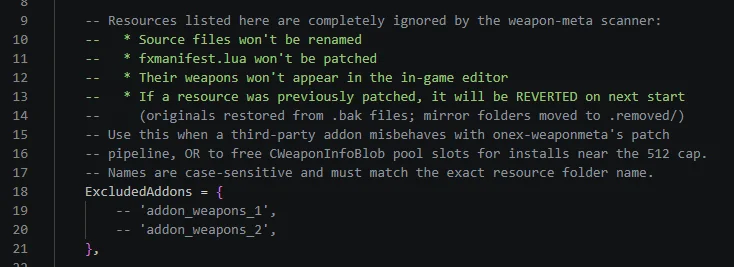
(Config.ExcludedAddons): Specific weapon addons can now be excluded from scanning entirely, with safe revert support if they're re-included later. This is useful when an escrowed weapon addon has malformed meta files that don't crash in-game but cause issues inside the weapon meta editor — just add it to the exclusion list.
AI config error messages
When an API key is missing or rejected, the AI assistant now shows a clear, actionable error explaining what to fix rather than failing silently.
Permission-aware startup banner
The server startup output is now split by permission level and grouped for readability, making it easier to see what the resource has access to on boot.
Self-healing manifest
The resource now automatically repairs its internal manifest on every startup, reducing issues caused by incomplete or corrupted state from previous sessions.
Portable v2 preset profiles
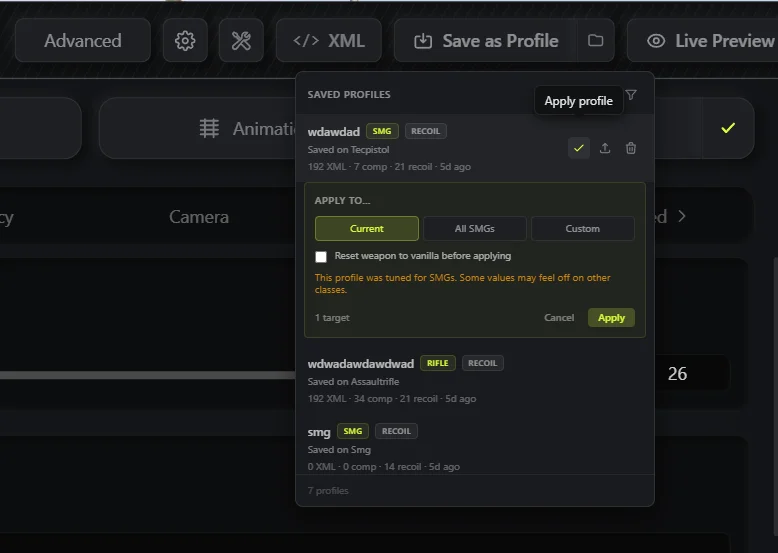
Presets are now weapon-agnostic — a preset made on any weapon can be applied to any other, regardless of category. Create a preset on an SMG and apply it directly to a pistol as a base. No category restrictions.
Multi-provider AI config
The AI assistant now supports multiple backend providers. Configuration is friendlier with improved error messages and an automatic retry countdown when rate-limited.
Blocked addon auto-prep
The server can now automatically prepare blocked weapon addons, including weaponcomponents.meta and weaponanimations.meta files, without requiring manual intervention.
Custom weapon resource support
Weapon addons that use globbed data_file paths in their resource manifests are now correctly detected and handled.
Stale preview indicator
The Live Preview button in the editor now shows a visual indicator when the in-game preview is out of date with your current unsaved changes.
Permission gate in editor UI
The editor now blocks interaction and shows a clear message when the required server.cfg permissions are not configured, preventing silent failures.
Improved1
Reduced idle CPU usage on the client.
The pause-blocker tick now runs at a capped rate, the recoil tick skips processing when no weapon is held, and damage number updates are now event-driven rather than polled — saving approximately 0.17ms per frame at idle.
Current Resmon Status :
- idle : 0.00ms
- active : 0.03 - 0.04ms (max)
For detailed resmon info check product page
Fixed13
Fixed the editor becoming unresponsive or slow when loading large weapon catalogs with 400 or more weapons.
Fixed a camera snap when toggling ADS (aim down sights).
The pitch baseline is now correctly re-anchored on each toggle.
Fixed an issue where weapon component attachment toggles (_comp.*) were not being mirrored into _attachPoints when changes were applied, causing attachments to appear unaffected in-game.
Fixed presets saving only the changed values instead of the full weapon snapshot, which caused incomplete restores when loading a preset later.
Fixed weapon edits being lost after a server restart.
Changes are now correctly preserved across restarts.
Fixed Reset to Base failing when combined meta files were corrupted.
The reset now recovers correctly in this state.
Fixed the scanner failing to correctly identify renamed meta files due to an incorrect path hash, which caused some weapons to be missed or duplicated.
Fixed suppressed filesystem warnings appearing in the console for addons that were already prepared.
Fixed broken escape sequences and malformed files{} blocks in addon helper patches, which could prevent addons from loading correctly.
Fixed test peds and vehicles created during debug mode not being cleaned up when the debug HUD was turned off.
Fixed a rare issue where the weapon validity cache could get corrupted, causing held-weapon detection to incorrectly report no weapon equipped.
Fixed the weapon list losing your current selection after a refresh, and corrected the DLC Badge popover positioning and display.
Fixed multiple visual issues with the DLC Badge popover: sub-pixel text blur caused by GPU rendering, incorrect positioning after CSS zoom correction, a missing smooth fade-out when closing, and an incorrect header state when metadata was corrupted versus a build mismatch.